Scan a food barcode
Point your phone at the barcode on a cereal box, yoghurt pouch or lunchbox snack. Milo looks up the product’s nutrition and ingredient data. If it is missing, photograph the label to add it.
Scan a food barcode with Milo to check its nutrition score and ingredients. See your family's allergen alerts and compare better-scoring swaps for the snacks you buy every week.
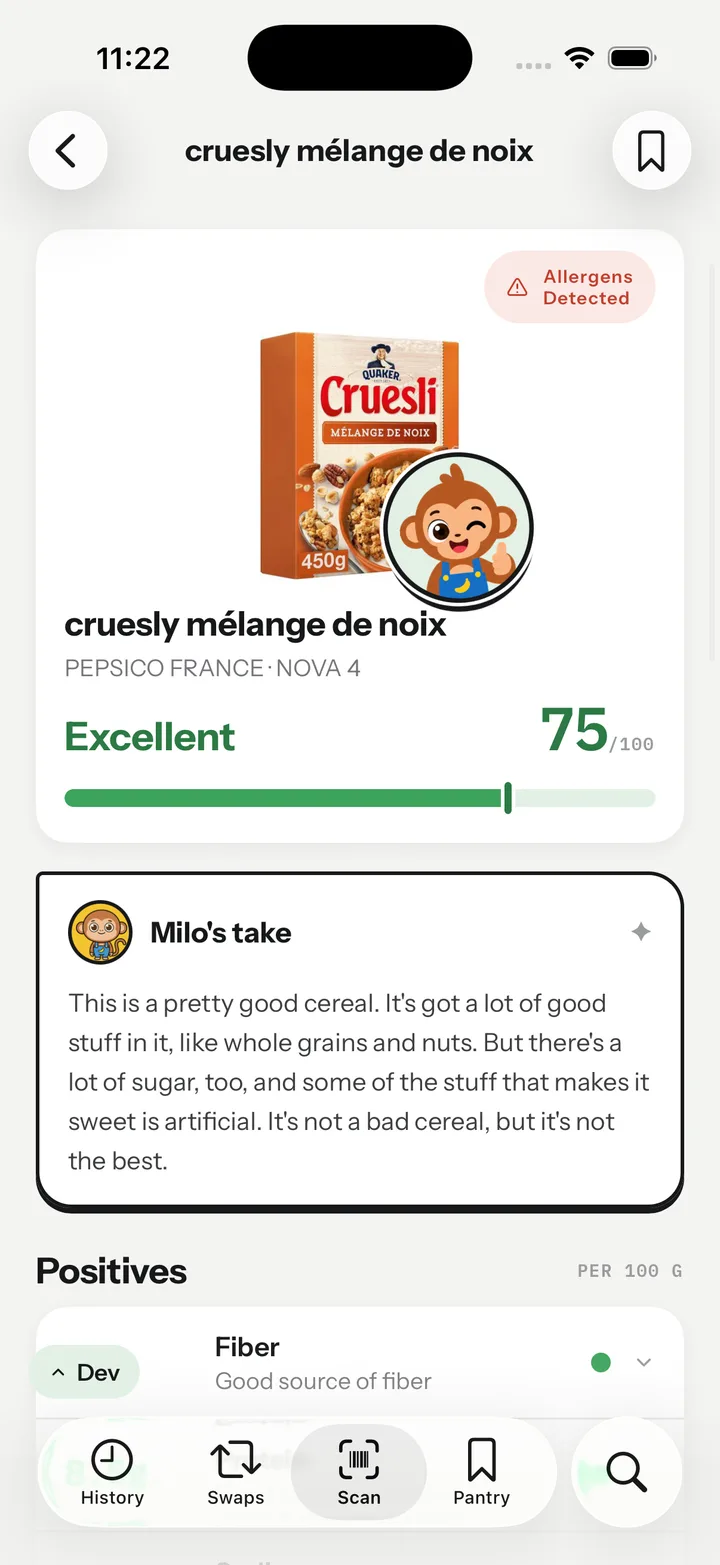
Point your phone at the barcode on a cereal box, yoghurt pouch or lunchbox snack. Milo looks up the product’s nutrition and ingredient data. If it is missing, photograph the label to add it.
Milo gives products with enough data a score from 0 to 100 and explains the result in plain words. Review nutrition, additives and processing, alongside alerts for your family’s selected allergens.
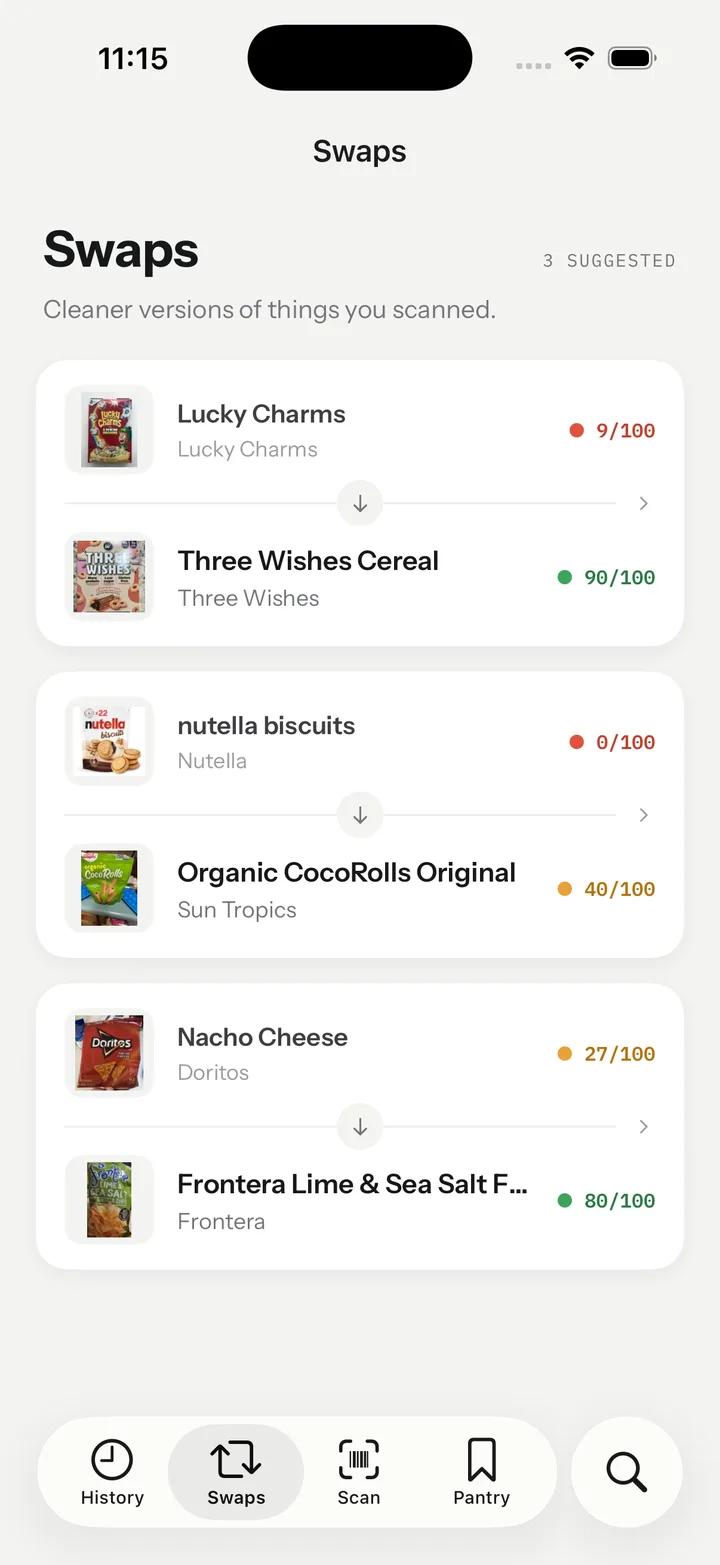
Milo looks for a better-scoring product in the same category and shows the scores side by side. Keep useful alternatives in your Swaps tab for your next shop.
Kids read the monkey. You read the score. Everyone leaves the aisle happy.




Four bands, one score out of 100. Nutrition per 100 g carries the most weight, then additives ranked by the strength of evidence against them, then how processed the food is. Read exactly how the score works.
Read the nutrition score, check ingredient details and find alternatives for your family’s everyday foods.
Compare alternatives in the same food category, with both scores side by side. Check the ingredients and choose the option that fits your family.
Explore healthy lunchbox snack swaps →Real scores from the app. Swaps stay in your Swaps tab so the change sticks.
“Milo was exactly what I was looking for. I knew Ultra Processed food was bad for my family, I just didn’t know what to look for.”
“My family meals feel safer now. Milo found harmful ingredients I’d never have spotted, so I can focus on what matters: feeding everyone healthy food.”
“WOW! So Milo has totally changed the way I shop for my family. I’m so glad I found it! Since using it our kids attention spans have improved dramatically!”
Milo has no ads, no affiliate links and no brand deals. No company can pay to change a score, so the recommendation you see is the one we would give our own kids.
A food barcode scanner looks up a packaged product’s nutrition and ingredient information. Milo brings that information into a score from 0 to 100, explains the result and checks for your family’s selected allergens.
How to read food labels →Milo’s food score considers nutrition, additives and processing. Products fall into four bands: Bad (0–24), Poor (25–49), Good (50–74) and Excellent (75–100), with a plain-language explanation alongside the number.
How the Milo score works →Milo shows nutrition information and explains the product’s score, helping you compare similar cereals. Check sugar per 100 g for a like-for-like comparison, then consider the portion your family eats.
Sugar in kids’ breakfast cereals →Milo uses the ingredient list to explain additives and their contribution to the food score. You can review those details alongside the nutrition panel when comparing products.
A parent’s guide to food additives →Milo includes the NOVA processing group when that information is available. Read the processing details alongside the nutrition score; they describe different aspects of the product.
The NOVA food groups explained →Choose your family’s allergens and Milo checks available ingredient and may-contain information for matches. One allergen list applies to the account, so include everyone’s needs and always check the current packet as recipes and database records can change.
Reading ingredient and allergen labels →Milo looks for a better-scoring alternative in the same category and displays both scores side by side. Keep useful options in Swaps, then check their ingredients and your school’s food rules before packing them.
Healthy lunchbox snack swaps →Milo uses Open Food Facts and products added by users, so coverage depends on the product data available. Photograph the ingredient list and nutrition panel to add missing details; Milo leaves a product unscored when it does not have enough information.
What a food score needs →Milo is designed for parents comparing food for their family. The score summarises product information rather than a child’s individual nutritional needs, and does not replace advice from your GP or paediatrician.
What the score means →Milo is coming soon to the iPhone App Store and is not available to download yet. An Android version is also planned.